
Gems
Gems let you save your frequently used guidelines (role, tone, rules) and apply them to a chat. With Gems, you don’t have to retype the same instructions every time.
Choose
From the input box, open the ⋯ menu > Gems and pick one.
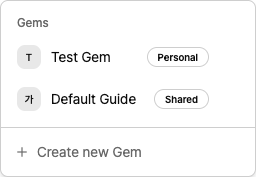
Shared — Saved to the workspace so everyone on the team can use it.
Personal — Saved to your account so only you can use it.
Once selected, that Gem’s settings are applied to the current chat.
After a Gem is applied to a chat, you can’t change or remove its guidelines mid-conversation.
Create

In Gems, click Create new Gem.
Choose where to save it as Shared or Personal.
Enter a name, and your guidelines.
You can edit or delete a Gem from the menu (⋮) next to each Gem.